White-label driver payment
Drivers who scan your charger's QR code can pay on pages that show your brand
on your own hostname, such as pay.example.com, instead of Ivora's. Two
tenant-scoped capabilities make this work:
- Tenant branding: the display name, logo, accent color and support contacts shown on the checkout, charging status, receipt and error pages.
- Payment domains: your own hostname for those pages. It uses the same DNS verification, certificate and edge pipeline as custom OCPP domains.
Fees and money flow do not change. With the Ivora Stripe adapter, the hosted checkout is a direct charge on your own connected Stripe account; see payment account.
Important
Branding is available in production. Payment domains are not available in
production yet: registration answers 409. Driver pages stay on the default
payment host until the production edge serves custom payment domains.
Set your branding
Branding is read with stations:read and changed with stations:write. Until
you set it, drivers see Ivora's default (is_default: true).
PUT /v1/tenants/{tenant_id}/branding with a JSON body:
{
  "display_name": "Example Charge",
  "primary_color": "#0f766e",
  "support_email": "support@example.com",
  "support_url": "https://example.com/help"
}
PUT replaces the name, color and contacts and keeps the logo. DELETE on the
same path returns to Ivora's default and removes the logo.
| Field | Rules |
|---|---|
display_name | Required, 1 to 80 characters, plain text |
primary_color | Optional #rrggbb; null keeps the page's default color |
support_email | Optional email address |
support_url | Optional https URL |
Upload a logo
Set the branding first, then send the image itself as the body of
PUT /v1/tenants/{tenant_id}/branding/logo, with the image's Content-Type
(for example image/png) instead of JSON.
- PNG, JPEG or WebP only (
image/png,image/jpeg,image/webp). SVG is refused because it can carry script. - At most 512 KB, 32 to 2048 pixels on each side, not animated.
- The content must match its
Content-Type.
Ivora re-encodes the image without its metadata and serves it from the API
origin at logo.url with Cache-Control: public, max-age=31536000, immutable.
The URL changes whenever the image does, so caches never show an old logo.
DELETE …/branding/logo removes it; the pages then show the display name as text.
Use your own payment hostname
The payment domain workflow is the custom OCPP domain
workflow at /v1/tenants/{tenant_id}/payment-domains:
POSTthe hostname, for example{"hostname": "pay.example.com"}. The response lists two DNS records: the address record pointing at Ivora's edge, and a TXT record named_ivora-payment.<hostname>that proves you control it.- Add both records with your DNS provider. Keep the address record DNS-only (not proxied).
POST …/payment-domains/{domain_id}/verify. The status moves frompending_dnstodns_verifiedonce both records check out.- Ivora's edge worker issues the certificate and the status becomes
active, withready: true.activation_errorexplains a stalled activation. DELETE …/payment-domains/{domain_id}disables it at once. Your DNS records stay in your account.
A hostname serves one purpose: register separate subdomains for chargers
(ocpp.example.com) and for drivers (pay.example.com). Automatic DNS
setup through a provider is available for OCPP domains only.
QR codes and checkout links
GET /v1/tenants/{tenant_id}/branding returns checkout_origin: your ready
payment domain's origin, or the default payment host while you have none.
Encode <checkout_origin>/checkout/<station>-<evse> in printed QR codes and
charger screens. Hosted checkout with return_surface: driver returns drivers to
the same origin automatically. When a domain is disabled or stops verifying,
new links fall back to the default payment host.
How a driver page picks the brand
Driver pages, or the application that serves them, call the public
GET /v1/branding/driver with the page's hostname (default: the request's
Host header) and the station from the QR path.
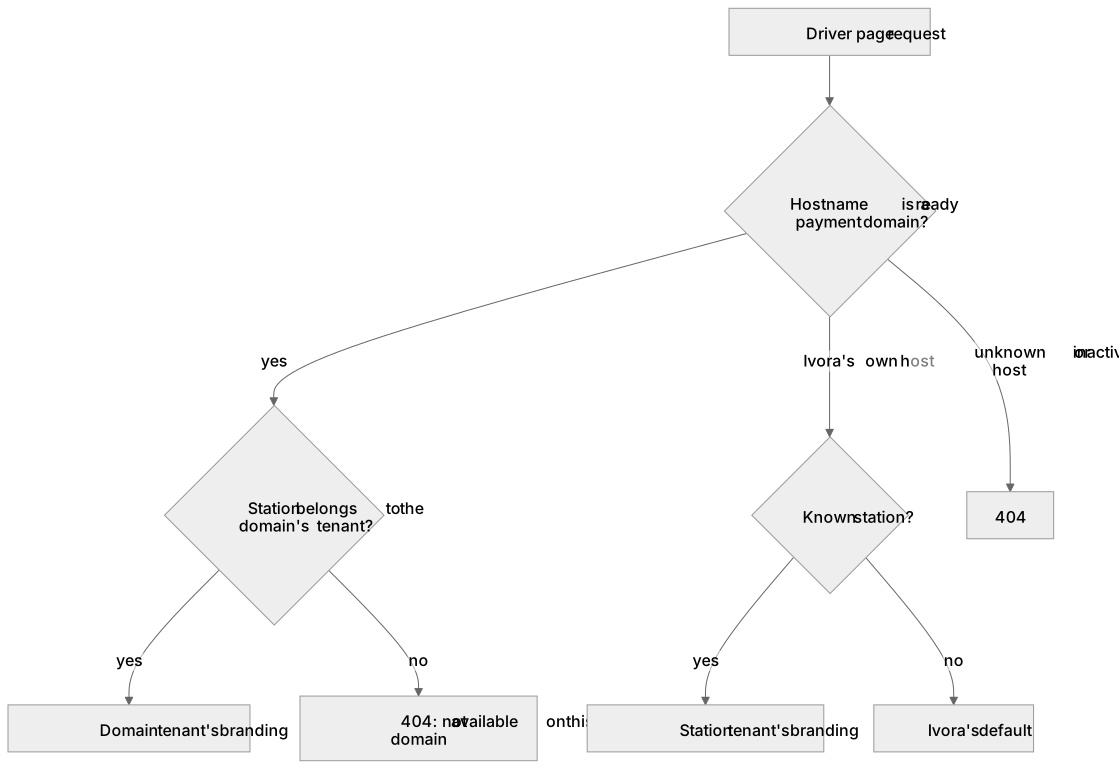
Diagram source
flowchart TD
  Request[Driver page request] --> Custom{Hostname is a ready payment domain?}
  Custom -->|yes| Owner{Station belongs to the domain's tenant?}
  Owner -->|yes| DomainBrand[Domain tenant's branding]
  Owner -->|no| Refused[404: not available on this domain]
  Custom -->|Ivora's own host| Station{Known station?}
  Station -->|yes| StationBrand[Station tenant's branding]
  Station -->|no| Default[Ivora's default]
  Custom -->|unknown or inactive custom host| Unknown[404]
The response never contains your tenant ID. A payment domain never shows another tenant's charger: besides this lookup, Ivora's edge answers 404 for a checkout, charging or receipt page on your domain whose charger is not yours.
Stripe Checkout branding
The card form itself is Stripe Checkout on your connected Stripe account. Its name, icon, logo and colors come from your Stripe account's branding settings in the Stripe Dashboard, not from Ivora. Set them there so the whole journey carries your brand.