Make your first request
Available: production, for Ivora staff and approved tenants. Production API
keys start with iv_live_; preproduction keys are rejected. Begin with a read-only
request. The documentation site never starts a charger or submits a payment
automatically.
- Sign in to Developer tools with the account Ivora granted production access. Production access is explicit: Ivora assigns your account to your tenant and role. Without that grant the API creates no tenant, workspace or API key for you, and owning a Host account does not grant API access. Viewers keep their restrictions.
- Create a key with
stations:readandbilling:read. Save the secret when it is shown; keep it in your backend's secret manager. - Read your access and use the returned tenant ID in later requests.
# Set IVORA_API_KEY securely in your shell environment first.
curl --fail-with-body https://api.ivoracharge.com/v1/access \
  -H "Authorization: Bearer $IVORA_API_KEY"

# Replace TENANT_ID with the ID returned by /v1/access.
curl --fail-with-body https://api.ivoracharge.com/v1/tenants/TENANT_ID/stations \
  -H "Authorization: Bearer $IVORA_API_KEY"
Each operation's page in the API reference lists its exact fields, scopes and responses.
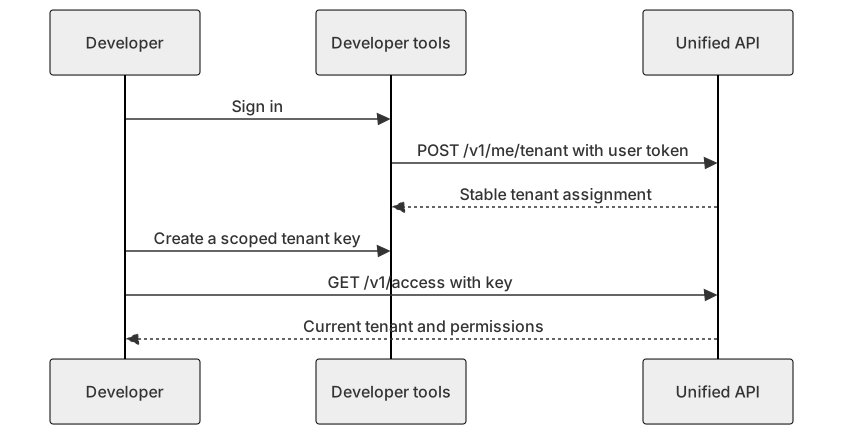
Diagram source
sequenceDiagram
  participant D as Developer
  participant P as Developer tools
  participant A as Unified API
  D->>P: Sign in
  P->>A: POST /v1/me/tenant with user token
  A-->>P: Stable tenant assignment
  D->>P: Create a scoped tenant key
  D->>A: GET /v1/access with key
  A-->>D: Current tenant and permissions
Tenant onboarding and key creation require a signed-in user. A fleet key cannot onboard users or issue more keys. A simulation workspace is separate from a CSMS tenant. Continue with authentication, inventory, or settlement choices.