Connecting chargers
Available: every environment. A charger keeps one OCPP WebSocket open to
wss://csmsws.ivoracharge.com/sp1/{station_name} (the station's
connection_url; see credentials). That connection
passes through an edge proxy that closes a WebSocket after about 100 seconds
without traffic. A charger that stays quiet for longer is disconnected and
reconnects, and while it is disconnected it cannot receive a start, a stop or a
display push.
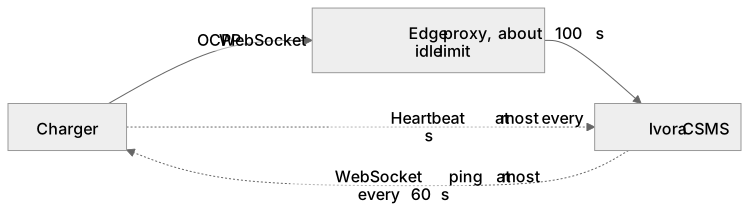
Diagram source
flowchart LR
  Charger[Charger] -->|OCPP WebSocket| Edge[Edge proxy, about 100 s idle limit]
  Edge --> Core[Ivora CSMS]
  Charger -. Heartbeat at most every 60 s .-> Core
  Core -. WebSocket ping at most every 60 s .-> Charger
Keep the connection alive
Keep both of these at or below 60 seconds, so traffic crosses the connection well inside the idle limit:
| Setting | Value | Why |
|---|---|---|
| Heartbeat interval | 60 seconds | The charger sends an OCPP Heartbeat this often |
| WebSocket ping interval | 50 seconds | The charger pings the connection even when it has nothing to report |
Ivora's server does its part by default: it answers BootNotification with a
60-second heartbeat interval and pings each connection every 60 seconds. Many
OCPP 1.6 chargers ignore the interval in the boot response and keep their own
configured values, so set the charger's own keys as part of onboarding:
| Protocol | How to set them |
|---|---|
| OCPP 1.6 | ChangeConfiguration with key HeartbeatInterval = 60, then WebSocketPingInterval = 50 |
| OCPP 2.0.1 and 2.1 | SetVariables on component OCPPCommCtrlr: HeartbeatInterval = 60 and WebSocketPingInterval = 50 |
The tenant API has no configuration command. Set the values in the charger's installer app or vendor portal, or ask Ivora support to send them once the charger is connected. Send them only as a deliberate onboarding step for that charger, never as incidental testing, and confirm the charger accepted them.
Onboarding checklist
- Register the station and set its connection credentials.
- Configure the charger with the station's
connection_urland password, and confirm the station reads as connected with a recentlast_seen. - Set the heartbeat interval to 60 seconds and the WebSocket ping interval to 50 seconds, as above.
- Leave the charger idle for at least 10 minutes and confirm it stayed
connected:
last_seenkeeps advancing about once a minute. - Only then publish it to drivers or start paid sessions on it.
Ivora's production monitoring warns Ivora's operators about connected stations whose recorded heartbeat interval is above 60 seconds or that keep dropping idle connections, so a charger that missed this step can be corrected.
Message history
Ivora keeps the raw OCPP message log of each charger for 30 days, and
routine Heartbeat messages for 3 days; a daily job deletes older messages.
The log serves support and investigation; the tenant API does not expose it.
Deleting old log rows never touches transactions, meter-derived usage, bills or
payments, which are separate records, and a station with a charging transaction
still open keeps its older messages until the transaction ends. If you need to
investigate a charger event, report it to Ivora within that window.