Custom OCPP domains
Use a hostname such as ocpp.example.com for your tenant's chargers. The
domain setup is a reusable charger-management API capability. Your application
can build its own onboarding screen using the same endpoints as Developer tools.
Important
Available in production: tenant domain registration, DNS checks, manual records
and certificate activation on the production edge. Automatic DNS setup through a
provider is not available in production yet; add the two records by hand.
Chargers without a custom domain keep the default
wss://csmsws.ivoracharge.com/sp1/{station_name} URL that each station record
returns; see credentials.
Connect a domain
Open Developer tools → OCPP domains.
- Add a dedicated hostname. Your tenant is selected from your authenticated account; no manual tenant ID allocation is needed.
- Choose Connect DNS provider. If available, continue to the provider, sign in and approve the displayed records. Ivora does not collect your DNS password or API token. Return to Ivora after approval.
- If automatic setup is unavailable, copy the two records into your DNS provider. If the domain has no DNS yet, configure its authoritative nameservers with the registrar first. Domain Connect cannot perform this delegation.
- Choose Check connection. DNS must pass both address and ownership checks.
- Wait for Ready. Certificate activation runs separately, normally within 15 minutes of successful DNS verification. DNS propagation can take longer.
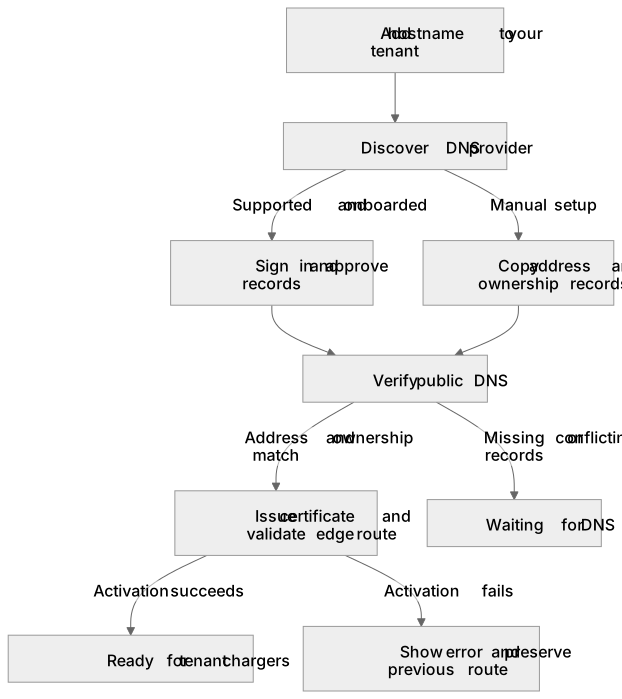
Diagram source
flowchart TD
  Hostname[Add hostname to your tenant] --> Discovery[Discover DNS provider]
  Discovery -->|Supported and onboarded| Approval[Sign in and approve records]
  Discovery -->|Manual setup| Records[Copy address and ownership records]
  Approval --> DNS[Verify public DNS]
  Records --> DNS
  DNS -->|Address and ownership match| TLS[Issue certificate and validate edge route]
  DNS -->|Missing or conflicting records| Waiting[Waiting for DNS]
  TLS -->|Activation succeeds| Ready[Ready for tenant chargers]
  TLS -->|Activation fails| Retry[Show error and preserve previous route]
Provider approval is not proof of successful setup. Ivora checks DNS again; a return URL or browser callback cannot activate the endpoint.
Manual records
The API returns the exact values for your domain. This example uses
ocpp.example.com; substitute the generated ownership token.
| Type | Full DNS name | Value | Setting |
|---|---|---|---|
| CNAME | ocpp.example.com | ocpp-edge.ivoracharge.com | DNS only, TTL 300 or Auto |
| TXT | _ivora-ocpp.ocpp.example.com | ivora-ocpp-verification=<generated token> | TTL 300 or Auto |
Editors that append the zone automatically use ocpp and _ivora-ocpp.ocpp as
the respective names. Keep both records for ongoing verification. Use a
dedicated hostname with no other address records at that name. Proxied records
are rejected: set the record to DNS only.
Point the CNAME at ocpp-edge.ivoracharge.com itself, not through another name
of yours, and not at csmsws.ivoracharge.com: that existing hostname is proxied
and is not the custom-domain routing target. An A record to the address it
resolves to does not verify.
ocpp-edge.ivoracharge.com is Ivora's DNS-only name for the production edge. If
the edge address changes, Ivora updates that one record and your CNAME keeps
working. This is not a redundant global edge.
TLS issuance also requires public port 80 reachability and any inherited CAA policy to allow Let's Encrypt. Only the ACME challenge path is served over HTTP.
API contract
Prefix: /v1/tenants/{tenant_id}/ocpp-domains. See the OCPP domains group in
the API reference for requests and schemas.
| Method and suffix | Purpose | Scope |
|---|---|---|
GET | List domains | stations:read |
POST | Register { "hostname": "ocpp.example.com" } | stations:write |
GET /{domain_id} | Read records and readiness | stations:read |
POST /{domain_id}/setup-link | Discover provider and obtain approval URL, or manual fallback reason | stations:write |
POST /{domain_id}/verify | Recheck DNS | stations:write |
DELETE /{domain_id} | Disable new connections on this hostname | stations:write |
Creating an existing hostname in the same tenant returns its existing record.
Recreating a disabled domain rotates the ownership challenge and starts setup
again. Verification requests have a 15-second cooldown. The internal limit is
five distinct hostnames per tenant, including disabled records. Unverified
requests do not reserve a hostname across tenants; only one tenant can hold a
verified hostname. A conflicting verified owner returns 409.
| Status | Meaning |
|---|---|
pending_dns | Address or ownership verification is incomplete |
dns_verified | DNS passed; certificate and route activation are pending |
active | The worker installed the TLS route; check ready for current validity |
disabled | New connections through this domain are denied |
Use ready, not just status, before showing the charger URL as usable. It is
false when DNS verification is older than 24 hours or the certificate expired.
The worker rechecks DNS every 15 minutes and renews certificates near expiry.
Charger identity and tenant access
The connection template is wss://ocpp.example.com/sp1/{station_name}.
Replace {station_name} with the registered OCPP station name (the
station's name), not its numeric inventory resource ID. Configure the station's existing OCPP username/password
for security profile 1. Domain setup does not register a charger or replace its
credentials. Provision the station first.
Each new WebSocket handshake checks that the domain is active and the station
belongs to the same tenant. The core still validates the charger's credentials.
The custom endpoint exposes only the authenticated /sp1/ route; unsupported
paths are rejected. Disabling a domain prevents new connections but does not
forcibly terminate existing WebSockets or remove customer DNS records.
Automatic provider onboarding
Production offers manual setup only. Cloudflare automatic setup is onboarded for preproduction's template; production's template has not been submitted.
Ivora has prepared a signed Cloudflare Domain Connect template and integration. Publishing the public signing-key TXT records, submitting the template to the Domain Connect repository, and Cloudflare onboarding remain operator steps. The UI offers a provider approval link only after template discovery succeeds and the published public key matches Ivora's private signing key. No registrar access, DNS write, public template submission or provider email is implied by creating an OCPP domain.
References: Cloudflare Domain Connect, Domain Connect specification, Let's Encrypt challenges.