Charger displays
Show your payment QR on a charger's own screen. You declare what each EVSE should show; Ivora stores that desired state, pushes it to the charger and pushes it again whenever the charger could have lost it. Your application still chooses the URL and serves the page it opens.
Important
Status: not enabled in production yet. Reads work, but PUT and DELETE
return 409 displays_disabled, and Ivora sends nothing to charger screens until
it enables displays. The routes are in the Charger displays group of the
API reference. Physical acceptance on Renova,
Sinexcel and generic OCPP 2.x chargers remains open.
How delivery works
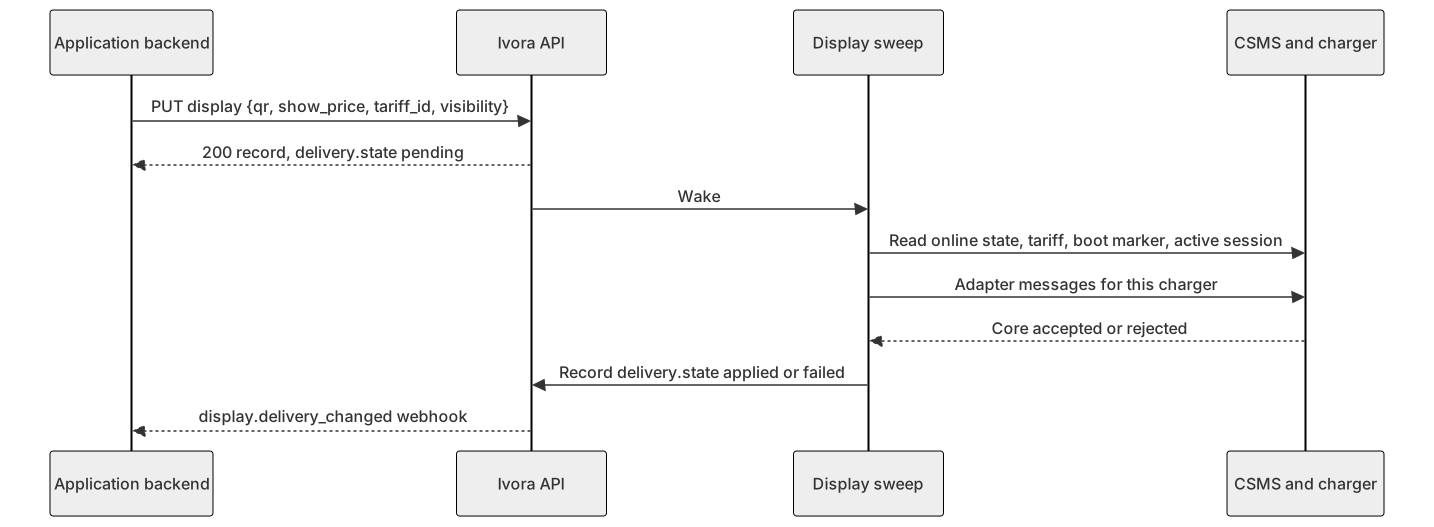
Diagram source
sequenceDiagram
  participant App as Application backend
  participant API as Ivora API
  participant Sweep as Display sweep
  participant C as CSMS and charger
  App->>API: PUT display {qr, show_price, tariff_id, visibility}
  API-->>App: 200 record, delivery.state pending
  API->>Sweep: Wake
  Sweep->>C: Read online state, tariff, boot marker, active session
  Sweep->>C: Adapter messages for this charger
  C-->>Sweep: Core accepted or rejected
  Sweep->>API: Record delivery.state applied or failed
  API-->>App: display.delivery_changed webhook
The write is synchronous and pure data: it stores the desired state and returns. It never waits for the charger. A sweep inside the API compares desired, applied and observed state and pushes only what differs. A write wakes the sweep at once; otherwise it runs about every 15 seconds.
The sweep pushes again when:
- the charger reboots (its boot marker changed), because the screen may be blank;
- the displayed price changes and the display shows price;
- you change
qr,show_price,tariff_idorvisibility; - Ivora changes the adapter that drives the charger. The push first clears what the previous adapter showed, when that adapter can clear;
- a previous push failed, after a backoff of 1, 5, 15 and then 30 minutes. A
reboot skips the wait, and so does new desired state: a
PUTthat changes a display on the station, aDELETEthat needs a clear, or Ivora changing its adapter.
An offline charger receives nothing. Displays it has not yet received stay
pending and are pushed on the first sweep after it reconnects.
If the charging core cannot be reached, the sweep stops and the next sweep
continues. A push that found the core unreachable counts as a failure for its
station's backoff, and its display reports failed with csms_unavailable;
the station's other displays keep their state. One sweep spends about 20
seconds at most, and stations it did not reach follow on the next one.
applied means the charging core accepted the push. Like other charger-bound
writes, it is dispatch acknowledgement, not proof of what the panel shows.
The generic OCPP 2.x adapters cannot know whether a charger has a screen at
all, so a 2.x charger without one still reports applied.
Check the station first
Every station record (list, read and create) carries a read-only display
field. Read it to decide whether to rely on the screen or print a QR card.
"display": {
  "adapter": "builtin-rcd",
  "reason": "matched",
  "qr": true,
  "price": true,
  "clear": false,
  "evses": [{"evse_number": 1, "state": "applied", "shown": true}]
}
reason | Meaning |
|---|---|
matched | An adapter matches the charger's reported vendor, model and protocol, or a generic adapter covers an OCPP 2.x charger with one EVSE |
assigned | Ivora assigned an adapter to this station |
not_booted | The charger has not connected yet, so its vendor is unknown. Displays wait as pending |
no_adapter | No adapter drives this charger's screen, including OCPP 2.x chargers with more than one EVSE and no vendor adapter. Use a printed QR |
protocol_unsupported | The assigned adapter does not support the charger's OCPP version |
assigned_unpublished | The assigned adapter is not available. Ivora must correct the assignment |
adapter is null for every reason except matched and assigned. clear
says whether the adapter can take a QR off the screen. price says whether it
also shows a price. evses lists the displays you configured.
API contract
Prefix: /v1/tenants/{tenant_id}/stations/{station_id}. {evse_number} is the
OCPP EVSE number (1–99) that station records expose as
connectors[].evse_number. See the Charger displays group in the
API reference for exact schemas.
| Method and suffix | Purpose | Scope |
|---|---|---|
GET /displays | List the station's displays and their delivery | stations:read |
PUT /evses/{evse_number}/display | Set the QR an EVSE screen shows | stations:write |
GET /evses/{evse_number}/display | Read one display and its delivery | stations:read |
DELETE /evses/{evse_number}/display | Stop maintaining a display | stations:write |
{"qr": "https://pay.example.com/checkout/HOST01-1", "show_price": true, "tariff_id": 42, "visibility": "idle"}| Field | Rules |
|---|---|
qr | Required. An https URL of at most 500 characters, without credentials, spaces or control characters. Any HTTPS origin is allowed. The screen encodes it verbatim, so never include customer data or secrets |
show_price | Default true. Show the price where the adapter can. You cannot supply price text |
tariff_id | Optional. A tariff in your tenant whose price the screen shows, usually the one your application bills with. Omit it to use the EVSE's connector tariff |
visibility | idle (default) or always. See visibility |
PUT and DELETE require an Idempotency-Key and follow the
retry rules: the same key and body replay the first
result. PUT returns 200 with the display record, which echoes tariff_id.
Sending the same content again keeps its revision and delivery; any change,
including a different tariff_id, is a new revision and returns to pending. On a connected charger with no adapter the display is
stored with state unsupported.
Errors: 404 station_not_found, 404 evse_not_found (no EVSE with that number),
404 tariff_not_found (tariff_id is not a tariff in your tenant),
404 display_not_configured on reads and deletes, 422 invalid_request for
field validation, 409 idempotency_key_reused, and 409 displays_disabled on
PUT and DELETE while Ivora has switched charger displays off in the
environment.
Delivery state
delivery.state | Meaning |
|---|---|
pending | The current revision is not yet acknowledged: the charger is offline, has not connected yet, or the push is queued |
applied | The core accepted the push of delivery.revision |
failed | The last push was rejected or unconfirmed. Ivora retries it; last_error holds the stable code |
unsupported | No adapter drives this charger's screen. Print the QR instead |
Typical last_error values are dispatch_unconfirmed (the core did not
confirm the push), csms_unavailable (the charging core could not be reached),
evse_not_found (the EVSE was removed), tariff_not_found (the tariff_id
tariff no longer exists in your tenant; nothing is sent until you PUT another)
and template_render_failed (the adapter could not render this display, for
example a message that would exceed a protocol limit).
delivery.shown says whether the last applied push showed the QR (true) or
cleared it (false). It is null before the first push.
Subscribe to display.delivery_changed webhooks
instead of polling. The event fires when a display is created or its state,
shown or deleted value changes. resource_id is
<station_id>-<evse_number> and data.display carries the full record.
Visibility and clearing
With visibility: "idle" the QR is shown while the connector is payable and
cleared otherwise. Payable means no active transaction on the EVSE and a
connector status of Available, Preparing, Finishing or Occupied.
always never clears.
Clearing needs an adapter with clear: true. On adapters with clear: false,
idle behaves like always: Ivora pushes the QR when it could have been lost
and never sends a clear. You can send idle everywhere and read clear to
explain the behavior to your users.
DELETE returns the final record with deleted: true:
- With
clear: true, the record reportsdelivery.statependinguntil Ivora has sent one clear for a QR it showed, including one a push was sending at that moment. Then Ivora forgets the display. A display that never reached the screen is forgotten without a clear. - Otherwise Ivora forgets the display at once. The response keeps the last
delivery.shown:trueonce a QR was sent,nullif none was. Aclear: falsecharger keeps showing the last QR:builtin-rcdchargers until they reboot,builtin-sinexcelchargers until something overwrites it, because the QR is stored in a configuration key that survives reboots. To point a screen elsewhere,PUTa newqrinstead of deleting.
Deleting a station also removes its displays, without clearing the screen on
any adapter. To blank a clear: true screen first, DELETE each display and
delete the station only once reading the display returns
404 display_not_configured.
Price
The displayed price comes from the display's tariff_id when you set one.
Otherwise it comes from the tariff of the EVSE's first connector that has one.
If your application bills with its own tariff rather than the connector
tariff, set tariff_id to that tariff so the screen shows what the driver
pays. With neither, there is no price: adapters that always carry a price
(builtin-rcd) show 0, and the generic OCPP 2.x adapters show no price text.
A price change, such as a new connector tariff or a PUT with a new
tariff_id, reaches the screen on the next sweep. Some adapters also
show one station-wide price; it uses the lowest-numbered EVSE that shows a
price and has one.
Ivora-managed adapters
Adapters translate your display into vendor messages. Ivora manages them; your application never supplies OCPP messages. Four adapters are built in:
| Adapter | Chargers | Protocols | Price | Clear |
|---|---|---|---|---|
builtin-rcd | Vendors RCD and RENOVA | OCPP 1.6, 2.0.1 and 2.1 | Yes: kWh price with the QR; tariff text by DefaultPrice on 1.6 | No |
builtin-sinexcel | Vendor SINEXCEL | OCPP 1.6 | No | No |
builtin-ocpp201 | Any vendor without its own adapter, chargers with one EVSE | OCPP 2.0.1 | Yes: tariff text as a second display message, cycled with the QR | Yes |
builtin-ocpp21 | Any vendor without its own adapter, chargers with one EVSE | OCPP 2.1 | Yes: tariff text as a second display message, cycled with the QR | Yes |
builtin-rcd and builtin-sinexcel cannot clear. builtin-sinexcel writes
the QR into the configuration key ChargePointQRCode_<evse_number>, which the
charger keeps across reboots.
OCPP 2.0.1 and 2.1 chargers with one EVSE are covered automatically: when no
adapter matches their vendor, builtin-ocpp201 or builtin-ocpp21 sends
standard SetDisplayMessage messages. The QR and the price text have the same
priority, so a screen that follows OCPP cycles between them. Without a price,
the price text is cleared. With visibility: "idle" both leave the screen
while the EVSE is in use; with always they stay. OCPP 2.1 chargers draw the
QR from your URL. OCPP 2.0.1 has no QR format, so the screen loads a PNG of
your qr from https://api.ivoracharge.com/v1/display-images/<sha256 of qr>.png:
a public, cacheable address that Ivora serves only for QRs a display has
pushed. These adapters cannot tell whether the charger has a screen, so keep
the printed QR as well.
These messages address the whole charger, not one EVSE. On a charger with
several EVSEs sharing a screen, one EVSE's QR would replace or alternate with
another's, and a driver could pay for the wrong plug. So OCPP 2.x chargers
with more than one EVSE, like OCPP 1.6 chargers, report no_adapter unless a
vendor adapter matches them.
Ivora administrators can add adapters for more models, including vendor-specific ones
that take precedence over the generic OCPP 2.x adapters, without an API
release. An adapter is a declarative template, not code, and is limited to four
OCPP actions: DataTransfer, ChangeConfiguration (OCPP 1.6),
SetDisplayMessage and ClearDisplayMessage. Validation refuses the standard
OCPP 1.6, security and ISO 15118 configuration keys, and keys naming URLs,
hosts, credentials, certificates, firmware, networking or profiles. It does not
judge vendor-specific keys or DataTransfer content, so Ivora reviews each
adapter's rendered messages before publishing it. Your qr is the only value
you supply, and adapters place it verbatim; every other value they send (EVSE
number, station name, price) comes from Ivora's records. Ask Ivora if your
charger model needs an adapter.
Retries
Charger commands are dispatched at most once, and unknown outcomes are reconciled by hand. Display pushes are the one deliberate exception: they set idempotent screen content, so Ivora resends them after failures and reboots. This never applies to commands or anything that moves money.
Limits
- Physical acceptance on real chargers is still open; see the status above.
appliedis dispatch acknowledgement, not proof of what the screen shows. A 2.x charger without a screen still reportsappliedunder the generic adapters.- A reboot is noticed on the next sweep, so a rebooted charger shows its QR again within about 15 seconds of reconnecting, not instantly. One sweep handles up to 100 stations; more stations take extra sweeps.
builtin-rcdsendsconnector_idequal to the EVSE number. Acceptance covers single-connector RCD units only.builtin-rcdalways sends a price with its QR message. Withouttariff_idor a connector tariff, or withshow_price: false, it sends 0.- Turning
show_priceoff everywhere does not remove a station-wide price already on the charger. qris limited to 500 characters becausebuiltin-sinexcelwrites it into an OCPP 1.6 configuration value, which holds at most 500.- A
builtin-sinexcelscreen keeps its last QR afterDELETE, even across reboots, until another value is written. - OCPP 1.6 chargers, and OCPP 2.x chargers with more than one EVSE, need a printed QR unless a vendor adapter drives them.
- The generic OCPP 2.x adapters are not yet accepted on physical chargers, and screens may differ in how they cycle the QR and the price text.
- When Ivora changes a station's adapter, the previous adapter's messages are cleared only if it can clear. A station left without any adapter keeps what was last shown.
- The legacy payment service still writes the screens of chargers provisioned through it until Ivora turns off its display writes per environment. On OCPP 2.x screens its QR stays in front of the generic adapters' messages until Ivora has turned those writes off and removed it.