



Connect an MCP client
The Ivora MCP server at https://api.ivoracharge.com/mcp works with a tenant-scoped API key. OAuth sign-in for MCP clients is not enabled on production yet: a client cannot sign in to Ivora through the browser.
Connect with an API key
Create a tenant-scoped API key (Authentication; prefer a read-only key to start) and add the server to your MCP client's configuration by hand: the URL https://api.ivoracharge.com/mcp with the key in an Authorization: Bearer header, kept in the client's secret environment and never committed to a repository. AI context and tools has the configuration for each client.
Note
The rest of this page describes OAuth sign-in as it will work once it is enabled on production. Until then the OAuth routes on https://api.ivoracharge.com answer 404 and the MCP server accepts API keys only.
The flow follows the MCP authorization specification, revision 2026-07-28:
authorization code with PKCE (S256 only), Protected Resource Metadata
(RFC 9728), Authorization Server Metadata (RFC 8414), Dynamic Client
Registration (RFC 7591), resource indicators (RFC 8707), the iss
authorization response parameter (RFC 9207) and token revocation (RFC 7009).
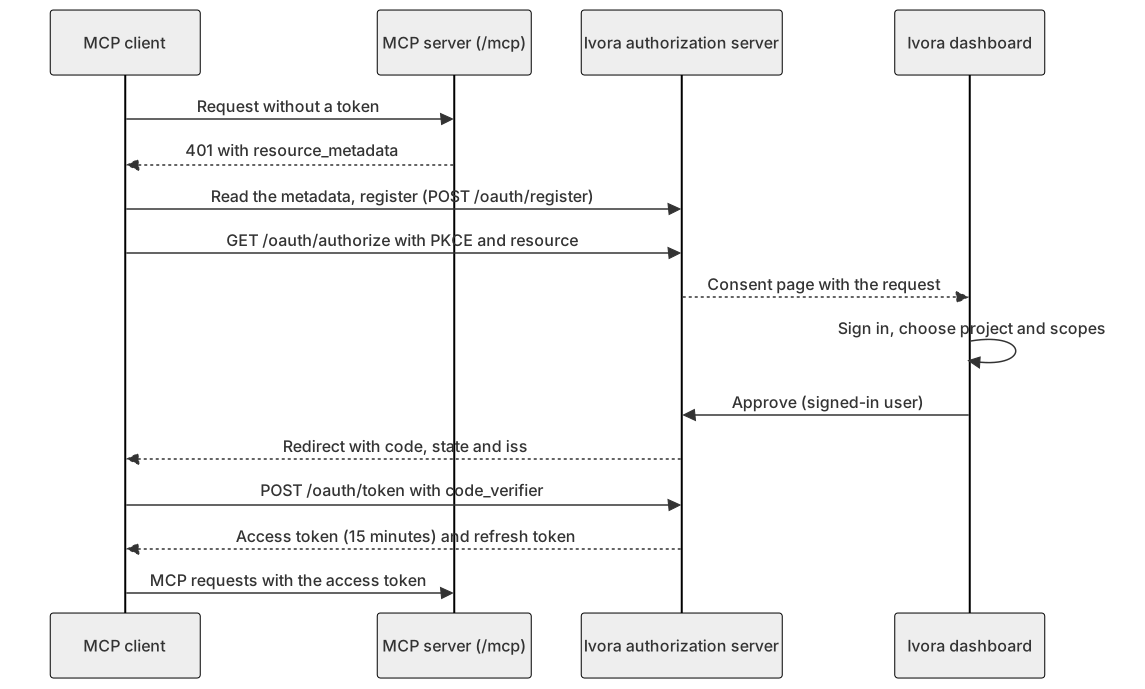
Diagram source
sequenceDiagram
  participant C as MCP client
  participant M as MCP server (/mcp)
  participant A as Ivora authorization server
  participant D as Ivora dashboard
  C->>M: Request without a token
  M-->>C: 401 with resource_metadata
  C->>A: Read the metadata, register (POST /oauth/register)
  C->>A: GET /oauth/authorize with PKCE and resource
  A-->>D: Consent page with the request
  D->>D: Sign in, choose project and scopes
  D->>A: Approve (signed-in user)
  A-->>C: Redirect with code, state and iss
  C->>A: POST /oauth/token with code_verifier
  A-->>C: Access token (15 minutes) and refresh token
  C->>M: MCP requests with the access token
Discovery
A request to /mcp without a valid token answers 401 with:
WWW-Authenticate: Bearer realm="Ivora preproduction",
  resource_metadata="https://api.ivoracharge.com/.well-known/oauth-protected-resource/mcp",
scope="billing:read stations:read tokens:read webhooks:read"| Document | URL |
|---|---|
| Protected Resource Metadata | https://api.ivoracharge.com/.well-known/oauth-protected-resource/mcp (also at /.well-known/oauth-protected-resource) |
| Authorization Server Metadata | https://api.ivoracharge.com/.well-known/oauth-authorization-server |
The resource is https://api.ivoracharge.com/mcp and the issuer is
https://api.ivoracharge.com. The metadata lists the endpoints:
/oauth/authorize, /oauth/token, /oauth/register and /oauth/revoke.
The protected resource lists the read-only scopes a client needs to start; the
authorization server lists every project scope. Client ID Metadata Documents
are not supported yet: clients register dynamically.
Registration
POST /oauth/register takes a JSON client metadata document and answers 201
with a client_id.
redirect_uris: 1 to 10 URIs, eachhttpswith a host, orhttpon a loopback host (localhostor a loopback address) for a desktop client. No fragments, no user information, no custom schemes. The authorization request must name one of them exactly.token_endpoint_auth_method:none(the default, a public client with PKCE),client_secret_postorclient_secret_basic. A secret is returned once; Ivora keeps only its digest.grant_types:authorization_code, optionally withrefresh_token(both by default).
A client's name and logo are its own claims. The consent page shows the redirect host and marks every client as unverified.
Registration and authorization requests are limited to 20 a minute per client
address (429 rate_limited), whatever Authorization header they carry. A
client registered more than 30 days ago that never got a connection is deleted;
register again.
Authorization and consent
The client opens /oauth/authorize with response_type=code, client_id,
redirect_uri, code_challenge (S256), code_challenge_method=S256, state,
resource=https://api.ivoracharge.com/mcp and, optionally, scope. An unknown
client or a redirect URI that is not registered is shown as an error page, never
redirected. Other errors (invalid_request, invalid_scope, invalid_target,
unsupported_response_type) return to the redirect URI with state and iss.
Ivora then sends you to the dashboard's consent page. Sign in with your usual Ivora account (no separate password), then choose:
- the project (and with it its team) the app may act on: one project per connection;
- the scopes: read-only by default (
stations:read,billing:read,tokens:read,webhooks:read). Write scopes andstations:adminare opt-in.
You can grant only project scopes your team role holds on that project. A
connection never carries an Ivora staff role: staff grant only projects they are
team members of, with their team role there.
Approving returns the browser to the app with a single-use code (valid for 2
minutes) plus state and iss. Approving again for the same app and project
replaces the earlier connection. The request expires after 10 minutes, and the
first signed-in user who opens it owns it.
Step-up for write scopes
A setting can require a fresh passkey or MFA sign-in (aal2, a second factor
used in the last 10 minutes) before any write scope is approved: every
*:write scope, stations:control, stations:diagnostics, stations:admin
and billing:refund. Where it is on, approving such a scope without it answers
403 step_up_required with details.scopes; sign in again with a second
factor, then approve. It is off by default for now.
Tokens
POST /oauth/token takes application/x-www-form-urlencoded parameters.
| Grant | Parameters |
|---|---|
authorization_code | code, redirect_uri, code_verifier, client_id (or client authentication), resource |
refresh_token | refresh_token, client_id, optional scope (narrower only), resource |
The answer has access_token (valid for 15 minutes), token_type Bearer,
expires_in, refresh_token and scope. Errors use the OAuth format:
invalid_grant (wrong verifier, expired, used or revoked code or token, a
different redirect URI), invalid_client, invalid_scope, invalid_target,
unsupported_grant_type and unauthorized_client.
- An access token's audience is the MCP server (
resource). Use it only at/mcp: presented to/v1directly it is refused with401 invalid_tokenand aWWW-Authenticate: Bearer error="invalid_token"challenge. Call/v1with an API key instead. - Through the MCP server, an access token acts like an API key bound to the chosen project with the granted scopes. Every request still checks your current team role: if your role loses a scope, the token loses it too. It never reaches another project or Ivora staff administration, and it cannot approve connections, manage keys or act as a signed-in user.
- Refresh tokens rotate on every use. Presenting a refresh token that was already used revokes the whole connection, all of its tokens included. A refresh may narrow the scopes of the new access token, never widen them.
- A connection lasts at most 90 days, then you consent again. A refresh token lasts 30 days after its last rotation.
- Presenting an authorization code twice revokes what it issued. A failed
exchange (wrong
code_verifierorredirect_uri, or an expired code) spends the code and ends the connection it would have opened: start again.
POST /oauth/revoke (RFC 7009) with token and the client's authentication:
a refresh token ends its connection, an access token ends itself. Unknown tokens
answer 200 as well.
Connected apps
The dashboard's Connected apps page uses these signed-in routes (API keys and OAuth tokens are refused):
| Route | Purpose |
|---|---|
GET /v1/oauth/requests/{request_id} | The consent page: the app, requested and default scopes, your projects with the scopes you hold, step-up state, earlier consents |
POST /v1/oauth/requests/{request_id}/approve | {"tenant_id", "scopes", "team_id"?}; returns redirect_to |
POST /v1/oauth/requests/{request_id}/deny | Returns redirect_to with error=access_denied |
GET /v1/me/connected-apps | Your connections with their project, scopes and last use |
DELETE /v1/me/connected-apps/{grant_id} | Disconnect one of yours |
GET /v1/tenants/{tenant_id}/connected-apps | Every member's connections to a project (owners, admins, developers and Ivora staff) |
DELETE /v1/tenants/{tenant_id}/connected-apps/{grant_id} | Disconnect a member's app from the project |
GET /v1/tenants/{tenant_id}/connected-apps/audit | Consents, token issues and refreshes, revocations and reuse detections |
Ivora keeps only digests of codes, tokens and client secrets.